Missed Call Report
1. Go to https://portal.lucidoneuc.com
2. Enter your login credentials. If you can't remember your password, please follow this article here.
3. Once logged in, from the top navigation menu, select "Reporting" (see image below).

4. By default, all calls for that day will load. Above the call log data, you will see a button on the left-hand side that says "Filters", click it.

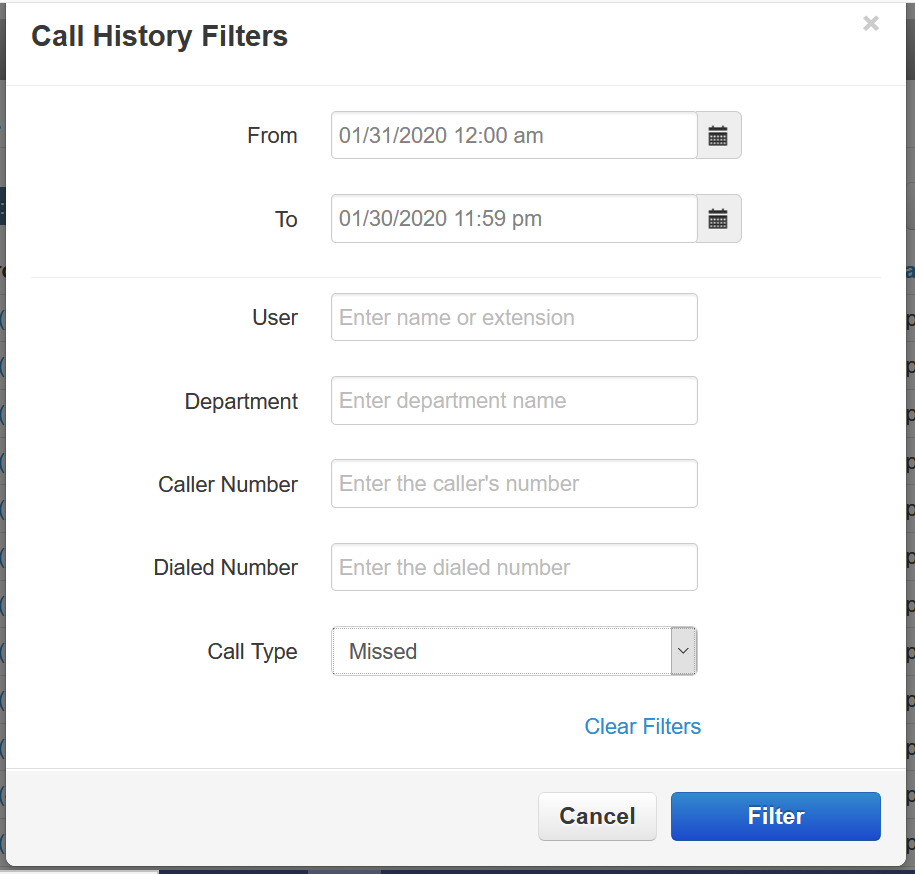
5. The "Call History Filters" pop-up screen will appear (see image below). Select your date and time range in the "From" and "To" fields and in "Call Type" select "Missed". Click "Filter".
6. That's it! You will now see missed calls for the date and time range you selected.
Was this article helpful?
That’s Great!
Thank you for your feedback
Sorry! We couldn't be helpful
Thank you for your feedback
Feedback sent
We appreciate your effort and will try to fix the article